Run clang-tidy on pull requests with GitHub Actions
Running clang-tidy once on a laptop is easy. Running it on every pull request is where projects get stuck: clang-tidy needs the real compile flags or it reports missing headers, the first run on an existing code base produces thousands of findings nobody asked for, and the output ends up in a CI log that contributors do not open.
With the GitHub Actions job below, clang-tidy findings appear as review comments on the lines a pull request changed, and the check turns red when something is left unfixed.
Step 1: Start with a small .clang-tidy
Put the configuration in the repository, not in the workflow. The same file is then used by CI, by editors (clangd, CLion, Qt Creator, Visual Studio) and by anyone running clang-tidy by hand.
Checks: >
  -*,
  bugprone-*,
  performance-*,
  clang-analyzer-*,
  -bugprone-easily-swappable-parameters
HeaderFilterRegex: '(^|/)(src|include)/'
Why this set:
bugprone-*,performance-*andclang-analyzer-*report likely defects rather than style preferences, so the first review comments contributors see are ones they agree with. Addmodernize-*,readability-*orcppcoreguidelines-*later, one group at a time.bugprone-easily-swappable-parametersis removed because it fires on nearly every function that takes two arguments of the same type.HeaderFilterRegexdecides which headers get reported. Up to LLVM 21, clang-tidy hides findings in headers unless they match this expression. From LLVM 22 it shows findings from every non-system header, which includes vendored code. Setting it explicitly gives the same result on every version: your ownsrc/andinclude/are reported,third_party/is not. Adjust the directory names to your layout.
Check the file before committing it:
$ clang-tidy --verify-config
No config errors detected.
Step 2: Generate compile_commands.json
clang-tidy parses each file the way the compiler does, so it needs the include paths, defines and
language standard of the real build. It reads them from a compilation database,
compile_commands.json. Without one, the typical result is
'foo.h' file not found [clang-diagnostic-error] and most checks never run on that file.
cmake -B build -DCMAKE_EXPORT_COMPILE_COMMANDS=ON
Configuring is enough; you do not need to compile. The file is written to
build/compile_commands.json. This works with the Makefile and Ninja generators, which is
what ubuntu-latest uses.
meson setup build
Meson always writes build/compile_commands.json.
sudo apt-get install -y bear
bear -- make
Bear records the compiler calls made by make and writes
compile_commands.json to the current directory. This one does need a full build.
Skip the database and pass the flags directly with the action's extra-args input:
extra-args: '-std=c++17 -Iinclude'
Two things commonly go wrong here:
- Third-party dependencies. If the configure step runs
find_package(Foo), installlibfoo-dev(or restore your vcpkg/Conan cache) before it, exactly as your build job does. - Generated headers. Protobuf output,
config.hand similar files only exist after the build step that produces them. Build those targets before running clang-tidy.
Step 3: Add the workflow
name: clang-tidy
on:
  pull_request:
    branches: [main]

jobs:
  clang-tidy:
    runs-on: ubuntu-latest
    permissions:
      contents: read
      pull-requests: write
    steps:
      - uses: actions/checkout@v5

      - name: Generate compile_commands.json
        run: cmake -B build -DCMAKE_EXPORT_COMPILE_COMMANDS=ON

      - uses: cpp-linter/cpp-linter-action@v2
        id: linter
        env:
          GITHUB_TOKEN: ${{ secrets.GITHUB_TOKEN }}
        with:
          version: '21'
          style: ''
          tidy-checks: ''
          database: build
          lines-changed-only: true
          tidy-review: true
          step-summary: true

      - name: Fail if clang-tidy reported anything
        if: steps.linter.outputs.clang-tidy-checks-failed > 0
        run: exit 1
| Input | What it does here |
|---|---|
version: '21' |
Installs clang-tidy 21 on the runner. Pin it, and use the same major version locally; new LLVM releases add and move checks. |
style: '' |
Turns clang-format off, so this job is clang-tidy only. Set it to file to check formatting against your .clang-format in the same step. |
tidy-checks: '' |
Uses your .clang-tidy and nothing else. The default value is a broad list of check groups that is appended to the Checks in your file, so CI reports more than a local run with the same .clang-tidy. |
database: build |
The directory that contains compile_commands.json. |
lines-changed-only: true |
Reports findings only on lines the pull request added or modified. |
tidy-review: true |
Posts the findings as a pull request review. |
step-summary: true |
Writes the same report to the workflow run's summary page. |
Step 4: Report only what the pull request changed
files-changed-onlydefaults totrue: only files touched by the pull request are analyzed.lines-changed-onlyfilters what is reported inside those files:
| Value | Reported |
|---|---|
false (default) |
Every finding in the changed files. |
diff |
Findings on any line shown in the diff, including unchanged context lines. |
true |
Findings on added or modified lines only. |
With true, someone who changes ten lines in a 3,000-line legacy file sees findings for those ten
lines. The existing findings stay where they are until somebody touches that code, so the code
base gets cleaner in the places that are actively worked on, and nobody has to land a
10,000-line cleanup first.
clang-tidy still parses the whole translation unit, so the run time depends on how many files changed, not on how many lines.
Step 5: Choose where the feedback appears
| Feedback | Input | Default | Token permission |
|---|---|---|---|
| Annotations in the "Files changed" tab | file-annotations |
true |
none |
| Report on the workflow run summary page | step-summary |
false |
none |
| One comment in the conversation, updated on each push | thread-comments: update |
false |
pull-requests: write |
| Review comments on the changed lines | tidy-review |
false |
pull-requests: write |
A review puts each finding next to the line it is about, with the check name. When clang-tidy has a fix for the finding, the comment contains a suggestion that can be committed from the browser.
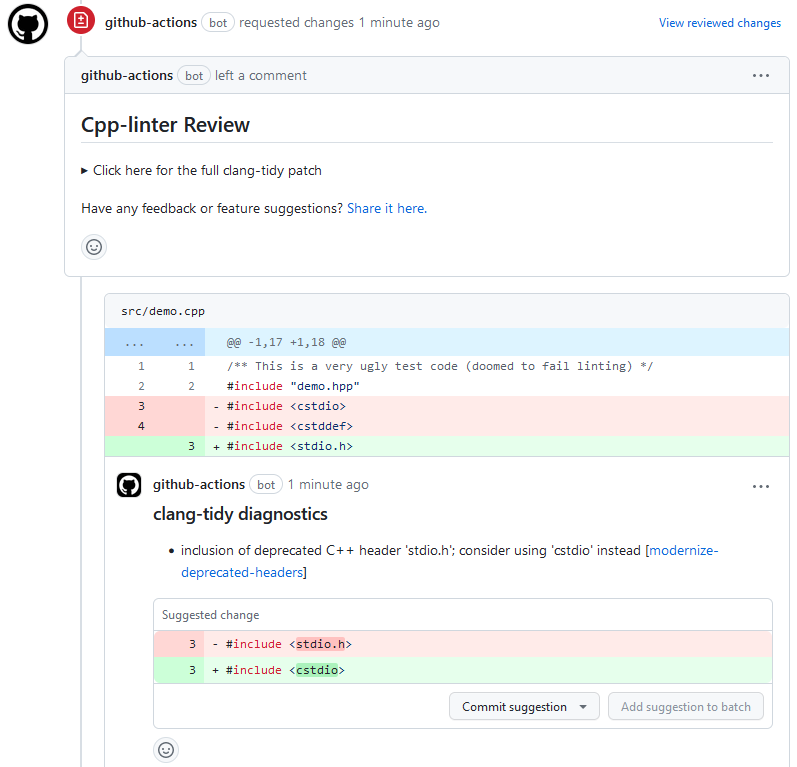
Things to know about reviews:
- They are skipped for draft and closed pull requests.
- Each push gets a new review, and the previous one is dismissed.
- GitHub only accepts review comments on lines that are part of the diff. Anything that does not
fit is counted in the review summary, which also carries the complete patch.
lines-changed-only: truekeeps that number small. - By default the review requests changes when there are findings and approves when there are none.
Approving requires the repository setting "Allow GitHub Actions to create and approve pull
requests". Set
passive-reviews: trueif the bot should only comment.
Step 6: Decide when the check fails
The action reports; it does not fail the job by itself. The last step in the workflow does that,
using the clang-tidy-checks-failed output (there is also clang-format-checks-failed, and
checks-failed for both).
A workable rollout is to leave that step out for the first couple of weeks, so contributors get used to the comments while nothing blocks a merge, and then add it and make the job a required status check.
Pull requests from forks
For a pull_request event that comes from a fork, GitHub hands the workflow a read-only
GITHUB_TOKEN, whatever the permissions block says. Reviews and thread comments cannot be
posted with it. Annotations and the step summary still work, because they do not go through the
API, and so does the failing check.
Do not switch the workflow to pull_request_target to get a write token. That event runs with
your repository's secrets, and this job configures a build from the pull request's code, which is
arbitrary code execution for anyone who opens a pull request.
Troubleshooting
| Symptom | Cause and fix |
|---|---|
'foo.h' file not found [clang-diagnostic-error] |
No database, wrong database directory, a dependency that is not installed on the runner, or a generated header that has not been built. See step 2. |
| CI reports far more than a local run | tidy-checks was left at its default and added check groups to yours; set it to ''. Otherwise the clang-tidy versions differ; pin version. |
| Nothing is reported for headers | HeaderFilterRegex does not match your header paths. |
| Findings from vendored code | Narrow HeaderFilterRegex, and exclude the sources with ignore: 'third_party|build'. |
| No review shows up | The pull request is a draft, comes from a fork, or the job lacks pull-requests: write. |
| The job is slow | Keep files-changed-only on. The analysis already uses every core (jobs: 0). Check the step timings in the run; if installing dependencies or configuring takes longer than the analysis, cache those. |
Run the same checks before the commit
The same clang-tidy version and the same .clang-tidy can run as a pre-commit hook, so most
findings never reach the pull request:
repos:
  - repo: https://github.com/cpp-linter/cpp-linter-hooks
    rev: v1.6.0
    hooks:
      - id: clang-tidy
        args: [--checks=.clang-tidy, --version=21]
One clang-format version everywhere covers keeping the hook, CI and local installs on one LLVM version.
Where to go next
- Every input and output is described in the cpp-linter-action documentation.
- If you already run separate clang-format and clang-tidy actions, Moving to cpp-linter shows how to merge them into this one step.
- Why cpp-linter? compares it with the other clang-tidy actions.